MongoDB副本集集群部署

1、概述:

组成:

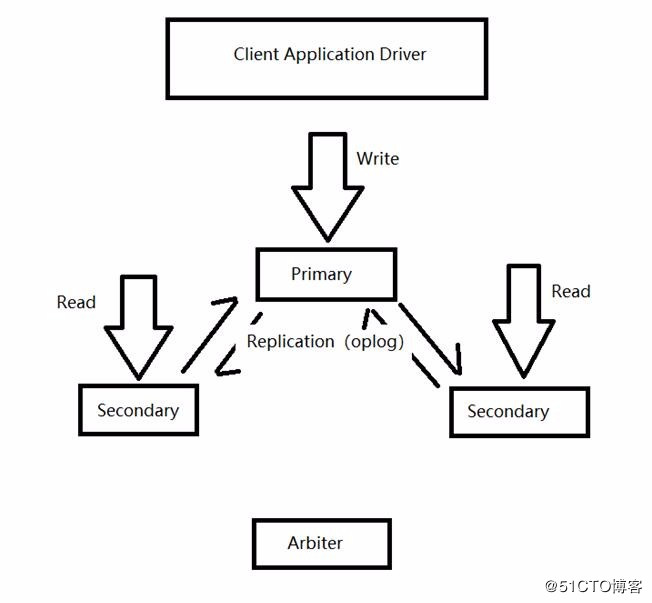
Mongodb复制集(副本集replica set)由一组Mongod实例(进程)组成,包含一个Primary节点和多个Secondary节点,Mongodb Driver(客户端)的所有数据都写入Primary,Secondary通过oplog来同步Primary的数据,保证主节点和从节点数据的一致性,复制集在完成主从复制的基础上,通过心跳机制,一旦primary节点出现宕机,则触发选举一个新的主节点,剩下的secondary节点指向新的primary,时间应该在10-30s内完成感知primary节点故障,实现高可用数据库集群;

特点:

主是唯一的,但不是固定的;
由大多数据原则保证数据的一致性;
从库无法写入(默认情况下,不使用驱动连接时,也是不能查询的);
相对于传统的主从结构,复制集可以自动容灾;

2、原理:

角色(按是否存储数据划分):

Primary:主节点,由选举产生,负责客户端的写操作,产生oplog日志文件;
Secondary:从节点,负责客户端的读操作,提供数据的备份和故障的切换;
Arbiter:仲裁节点,只参与选举的投票,不会成为primary,也不向Primary同步数据,若部署了一个2个节点的复制集,1个Primary,1个Secondary,任意节点宕机,复制集将不能提供服务了(无法选出Primary),这时可以给复制集添加一个Arbiter节点,即使有节点宕机,仍能选出Primary;

角色(按类型区分):

Standard(标准):这种是常规节点,它存储一份完整的数据副本,参与投票选举,有可能成为主节点;
Passive(被动):存储完整的数据副本,参与投票,不能成为活跃节点。
Arbiter(投票):仲裁节点只参与投票,不接收复制的数据,也不能成为活跃节点。
注:每个参与节点(非仲裁者)有个优先权(0-1000),优先权(priority)为0则是被动的,不能成为活跃节点,优先权不为0的,按照由大到小选出活跃节点,优先值一样的则看谁的数据比较新;
注:Mongodb 3.0里,复制集成员最多50个,参与Primary选举投票的成员最多7个;

选举:
每个节点通过优先级定义出节点的类型(标准、被动、投票);
标准节点通过对比自身数据进行选举出peimary节点或者secondary节点;
影响选举的因素:
1.心跳检测:复制集内成员每隔两秒向其他成员发送心跳检测信息,若10秒内无响应,则标记其为不可用;
2.连接:在多个节点中,最少保证两个节点为活跃状态,如果集群中共三个节点,挂掉两个节点,那么剩余的节点无论状态是primary还是处于选举过程中,都会直接被降权为secondary;

触发选举的情况:
1.初始化状态

2.从节点们无法与主节点进行通信 3.主节点辞职
主节点辞职的情况:
1.在接收到replSetStepDown命令后;
2.在现有的环境中,其他secondary节点的数据落后于本身10s内,且拥有更高优先级;
3.当主节点无法与群集中多数节点通信;
注:当主节点辞职后,主节点将关闭自身所有的连接,避免出现客户端在从节点进行写入操作;
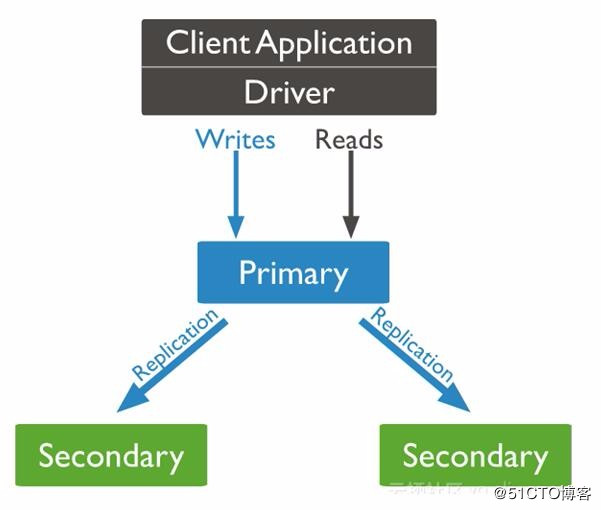
图片1

3、应用案例:

centos7部署MongoDB数据库复制集(超详细)

异常处理:

当Primary宕机时,如果有数据未同步到Secondary,当Primary重新加入时,如果新的Primary上已经发生了写操作,则旧Primary需要回滚部分操作,以保证数据集与新的Primary一致。旧Primary将回滚的数据写到单独的rollback目录下,数据库管理员可根据需要使用mongorestore进行恢复。

4、部署MongoDB副本集集群

4.1 下载mongo版本

https://fastdl.mongodb.org/linux/mongodb-linux-x86_64-4.0.5.tgz

4.2 解压重命名:

1
2
3
tar xf mongodb-linux-x86_64-4.0.5.tgz
mv mongodb-linux-x86_64-4.0.5 mongodb
mkdir mongodb/{data,logs}

4.3 优化系统参数:

1
2
3
4
5
6
sudo vim /etc/security/limits.conf

* soft nofile 655350
* hard nofile 655350
* soft nproc 655350
* hard nproc 655350

修改用户的 max user process

1
2
3
4
sudo vim /etc/security/limits.d/20-nproc.conf

* soft nproc 655350
root soft nproc unlimited

4.4 生成集群认证文件

1
2
3
4
openssl rand -base64 756 > mongodb/mongokey
chmod 400 mongodb/mongokey
scp mongodb/mongokey admin@192.168.1.101:~/mongodb/
scp mongodb/mongokey admin@192.168.1.102:~/mongodb/

5、配置服务启动

5.1 安装supervisor

1
2
3
wget https://bootstrap.pypa.io/get-pip.py --no-check-certificate
sudo python get-pip.py
sudo pip install supervisor

5.2 配置supervisor启动mongo服务

1
2
3
4
5
6
7
8
9
10
11
12
13
14
15
16
17
18
19
20
21
22
23
24
25
26
27
28
29
30
31
32
33
34
35
36
37
38
39
40
41
42
43
44
45
46
47
48
49
50
51
52
53
54
55
56
57
58
59
60
61
62
63
64
65
66
67
68
69
70
71
72
73
74
75
76
77
78
79
80
81
82
83
84
85
86
87
88
89
90
91
92
93
94
95
96
97
98
99
100
101
102
103
104
105
106
107
108
109
110
111
112
113
114
115
116
117
118
119
120
121
122
123
124
125
126
127
128
129
130
131
132
133
134
135
136
137
138
139
140
141
142
143
144
145
146
147
148
149
150
151
152
153
154
155
156
157
158
159
160
161
162
163
164
165
mkdir supervisor

cat >> supervisor/supervisor.conf <<EOF
; Sample supervisor config file.
;
; For more information on the config file, please see:
; http://supervisord.org/configuration.html
;
; Notes:
; - Shell expansion ("~" or "/work/admin/") is not supported. Environment
; variables can be expanded using this syntax: "%(ENV_HOME)s".
; - Quotes around values are not supported, except in the case of
; the environment= options as shown below.
; - Comments must have a leading space: "a=b ;comment" not "a=b;comment".
; - Command will be truncated if it looks like a config file comment, e.g.
; "command=bash -c 'foo ; bar'" will truncate to "command=bash -c 'foo ".

[unix_http_server]
file=/tmp/supervisor.sock ; the path to the socket file
;chmod=0700 ; socket file mode (default 0700)
;chown=nobody:nogroup ; socket file uid:gid owner
;username=user ; default is no username (open server)
;password=123 ; default is no password (open server)

[inet_http_server] ; inet (TCP) server disabled by default
port=127.0.0.1:9001 ; ip_address:port specifier, *:port for all iface
username=supervisor ; default is no username (open server)
password=5tQxmjDt2Gh9VpMQ ; default is no password (open server)

[supervisord]
logfile=/tmp/supervisord.log ; main log file; default /supervisord.log
logfile_maxbytes=50MB ; max main logfile bytes b4 rotation; default 50MB
logfile_backups=10 ; # of main logfile backups; 0 means none, default 10
loglevel=info ; log level; default info; others: debug,warn,trace
pidfile=/tmp/supervisord.pid ; supervisord pidfile; default supervisord.pid
nodaemon=false ; start in foreground if true; default false
minfds=1024 ; min. avail startup file descriptors; default 1024
minprocs=200 ; min. avail process descriptors;default 200
;umask=022 ; process file creation umask; default 022
;user=chrism ; default is current user, required if root
;identifier=supervisor ; supervisord identifier, default is 'supervisor'
;directory=/tmp ; default is not to cd during start
;nocleanup=true ; don't clean up tempfiles at start; default false
;childlogdir=/tmp ; 'AUTO' child log dir, default
;environment=KEY="value" ; key value pairs to add to environment
;strip_ansi=false ; strip ansi escape codes in logs; def. false

; The rpcinterface:supervisor section must remain in the config file for
; RPC (supervisorctl/web interface) to work. Additional interfaces may be
; added by defining them in separate [rpcinterface:x] sections.

[rpcinterface:supervisor]
supervisor.rpcinterface_factory = supervisor.rpcinterface:make_main_rpcinterface

; The supervisorctl section configures how supervisorctl will connect to
; supervisord. configure it match the settings in either the unix_http_server
; or inet_http_server section.

[supervisorctl]
serverurl=unix:///tmp/supervisor.sock ; use a unix:// URL for a unix socket
;serverurl=http://127.0.0.1:9001 ; use an http:// url to specify an inet socket
;username=chris ; should be same as in [*_http_server] if set
;password=123 ; should be same as in [*_http_server] if set
;prompt=mysupervisor ; cmd line prompt (default "supervisor")
;history_file=~/.sc_history ; use readline history if available

; The sample program section below shows all possible program subsection values.
; Create one or more 'real' program: sections to be able to control them under
; supervisor.


[program:mongod]
command=/work/admin/mongodb/bin/mongod --dbpath /work/admin/mongodb/data --bind_ip 0.0.0.0 --logpath /work/admin/mongodb/logs/mongo.log --oplogSize 4000 --replSet vbox
directory=/work/admin/mongodb
redirect_stderr=true
autorestart = true

#[program:filebeat]
#command=/work/admin/filebeat/filebeat start
#directory=/work/admin/filebeat
#redirect_stderr=true

;[program:theprogramname]
;command=/bin/cat ; the program (relative uses PATH, can take args)
;process_name=%(program_name)s ; process_name expr (default %(program_name)s)
;numprocs=1 ; number of processes copies to start (def 1)
;directory=/tmp ; directory to cwd to before exec (def no cwd)
;umask=022 ; umask for process (default None)
;priority=999 ; the relative start priority (default 999)
;autostart=true ; start at supervisord start (default: true)
;startsecs=1 ; # of secs prog must stay up to be running (def. 1)
;startretries=3 ; max # of serial start failures when starting (default 3)
;autorestart=unexpected ; when to restart if exited after running (def: unexpected)
;exitcodes=0,2 ; 'expected' exit codes used with autorestart (default 0,2)
;stopsignal=QUIT ; signal used to kill process (default TERM)
;stopwaitsecs=10 ; max num secs to wait b4 SIGKILL (default 10)
;stopasgroup=false ; send stop signal to the UNIX process group (default false)
;killasgroup=false ; SIGKILL the UNIX process group (def false)
;user=chrism ; setuid to this UNIX account to run the program
;redirect_stderr=true ; redirect proc stderr to stdout (default false)
;stdout_logfile=/a/path ; stdout log path, NONE for none; default AUTO
;stdout_logfile_maxbytes=1MB ; max # logfile bytes b4 rotation (default 50MB)
;stdout_logfile_backups=10 ; # of stdout logfile backups (0 means none, default 10)
;stdout_capture_maxbytes=1MB ; number of bytes in 'capturemode' (default 0)
;stdout_events_enabled=false ; emit events on stdout writes (default false)
;stderr_logfile=/a/path ; stderr log path, NONE for none; default AUTO
;stderr_logfile_maxbytes=1MB ; max # logfile bytes b4 rotation (default 50MB)
;stderr_logfile_backups=10 ; # of stderr logfile backups (0 means none, default 10)
;stderr_capture_maxbytes=1MB ; number of bytes in 'capturemode' (default 0)
;stderr_events_enabled=false ; emit events on stderr writes (default false)
;environment=A="1",B="2" ; process environment additions (def no adds)
;serverurl=AUTO ; override serverurl computation (childutils)

; The sample eventlistener section below shows all possible eventlistener
; subsection values. Create one or more 'real' eventlistener: sections to be
; able to handle event notifications sent by supervisord.

;[eventlistener:theeventlistenername]
;command=/bin/eventlistener ; the program (relative uses PATH, can take args)
;process_name=%(program_name)s ; process_name expr (default %(program_name)s)
;numprocs=1 ; number of processes copies to start (def 1)
;events=EVENT ; event notif. types to subscribe to (req'd)
;buffer_size=10 ; event buffer queue size (default 10)
;directory=/tmp ; directory to cwd to before exec (def no cwd)
;umask=022 ; umask for process (default None)
;priority=-1 ; the relative start priority (default -1)
;autostart=true ; start at supervisord start (default: true)
;startsecs=1 ; # of secs prog must stay up to be running (def. 1)
;startretries=3 ; max # of serial start failures when starting (default 3)
;autorestart=unexpected ; autorestart if exited after running (def: unexpected)
;exitcodes=0,2 ; 'expected' exit codes used with autorestart (default 0,2)
;stopsignal=QUIT ; signal used to kill process (default TERM)
;stopwaitsecs=10 ; max num secs to wait b4 SIGKILL (default 10)
;stopasgroup=false ; send stop signal to the UNIX process group (default false)
;killasgroup=false ; SIGKILL the UNIX process group (def false)
;user=chrism ; setuid to this UNIX account to run the program
;redirect_stderr=false ; redirect_stderr=true is not allowed for eventlisteners
;stdout_logfile=/a/path ; stdout log path, NONE for none; default AUTO
;stdout_logfile_maxbytes=1MB ; max # logfile bytes b4 rotation (default 50MB)
;stdout_logfile_backups=10 ; # of stdout logfile backups (0 means none, default 10)
;stdout_events_enabled=false ; emit events on stdout writes (default false)
;stderr_logfile=/a/path ; stderr log path, NONE for none; default AUTO
;stderr_logfile_maxbytes=1MB ; max # logfile bytes b4 rotation (default 50MB)
;stderr_logfile_backups=10 ; # of stderr logfile backups (0 means none, default 10)
;stderr_events_enabled=false ; emit events on stderr writes (default false)
;environment=A="1",B="2" ; process environment additions
;serverurl=AUTO ; override serverurl computation (childutils)

; The sample group section below shows all possible group values. Create one
; or more 'real' group: sections to create "heterogeneous" process groups.

;[group:thegroupname]
;programs=progname1,progname2 ; each refers to 'x' in [program:x] definitions
;priority=999 ; the relative start priority (default 999)

; The [include] section can just contain the "files" setting. This
; setting can list multiple files (separated by whitespace or
; newlines). It can also contain wildcards. The filenames are
; interpreted as relative to this file. Included files *cannot*
; include files themselves.

;[include]
;files = relative/directory/*.ini

EOF

5.3 启动mongo看有没有报错

1
2
3
4
5
6
7
8
9
10
11
12
13
14
15
16
17
18
19
20
21
supervisord -c supervisor/supervisor.conf
./mongodb/bin/mongo
Server has startup warnings:
2019-01-07T17:25:45.458+0800 I CONTROL [initandlisten]
2019-01-07T17:25:45.458+0800 I CONTROL [initandlisten] ** WARNING: Access control is not enabled for the database.
2019-01-07T17:25:45.458+0800 I CONTROL [initandlisten] ** Read and write access to data and configuration is unrestricted.
2019-01-07T17:25:45.458+0800 I CONTROL [initandlisten]
2019-01-07T17:25:45.458+0800 I CONTROL [initandlisten] ** WARNING: This server is bound to localhost.
2019-01-07T17:25:45.458+0800 I CONTROL [initandlisten] ** Remote systems will be unable to connect to this server.
2019-01-07T17:25:45.458+0800 I CONTROL [initandlisten] ** Start the server with --bind_ip <address> to specify which IP
2019-01-07T17:25:45.458+0800 I CONTROL [initandlisten] ** addresses it should serve responses from, or with --bind_ip_all to
2019-01-07T17:25:45.458+0800 I CONTROL [initandlisten] ** bind to all interfaces. If this behavior is desired, start the
2019-01-07T17:25:45.458+0800 I CONTROL [initandlisten] ** server with --bind_ip 127.0.0.1 to disable this warning.
2019-01-07T17:25:45.458+0800 I CONTROL [initandlisten]
2019-01-07T17:25:45.458+0800 I CONTROL [initandlisten] ** WARNING: /sys/kernel/mm/transparent_hugepage/enabled is 'always'.
2019-01-07T17:25:45.458+0800 I CONTROL [initandlisten] ** We suggest setting it to 'never'
2019-01-07T17:25:45.458+0800 I CONTROL [initandlisten]
2019-01-07T17:25:45.458+0800 I CONTROL [initandlisten] ** WARNING: /sys/kernel/mm/transparent_hugepage/defrag is 'always'.
2019-01-07T17:25:45.458+0800 I CONTROL [initandlisten] ** We suggest setting it to 'never'
2019-01-07T17:25:45.458+0800 I CONTROL [initandlisten]

5.4 报错有点多,我们一一解决:

5.4.1 第一个没有启动认证登录,第二个没有绑定IP地址,可以通过修改启动配置来解决
1
2
3
4
[program:mongod]
command=/work/admin/mongodb/bin/mongod --keyFile /work/admin/mongodb/mongokey --dbpath /work/admin/mongodb/data --auth --bind_ip 0.0.0.0 --logpath /work/admin/mongodb/logs/mongo.log --oplogSize 4000 --replSet vbox
directory=/work/admin/mongodb
redirect_stderr=true
5.4.2 第三四个通用问题,这是centos7的解决办法
1
2
3
4
5
6
7
8
9
sudo mkdir /etc/tuned/no-thp
sudo vim /etc/tuned/no-thp/tuned.conf
[main]
include=virtual-guest

[vm]
transparent_hugepages=never

sudo tuned-adm profile no-thp

重新启动mongo

1
2
3
4
5
./mongodb/bin/mongo
MongoDB shell version v4.0.5
connecting to: mongodb://127.0.0.1:27017/?gssapiServiceName=mongodb
Implicit session: session { "id" : UUID("70d10d95-2304-4294-a959-92b4a2cad081") }
MongoDB server version: 4.0.5

6、配置集群

6.1 集群配置

1
2
3
4
5
config = { _id:"vbox", members:[
{_id:0,host:"mongodb1:27017"},
{_id:1,host:"mongodb2:27017"},
{_id:2,host:"mongodb3:27017"}]
}

6.2 初始化集群

1
2
3
4
5
6
7
8
9
10
11
12
13
14
15
16
17
18
19
20
21
22
23
24
25
26
27
28
29
30
31
32
33
34
35
36
37
38
39
40
41
42
43
44
45
46
47
48
49
50
51
52
53
54
55
56
57
58
59
60
61
62
63
64
65
66
67
68
69
70
71
72
73
74
75
76
77
78
79
80
81
82
83
84
85
86
87
88
89
90
91
92
93
94
95
96
97
98
99
100
101
102
103
104
vbox:SECONDARY> rs.initiate(config);
vbox:SECONDARY> rs.status();
{
"set" : "vbox",
"date" : ISODate("2019-01-07T12:03:12.665Z"),
"myState" : 2,
"term" : NumberLong(0),
"syncingTo" : "",
"syncSourceHost" : "",
"syncSourceId" : -1,
"heartbeatIntervalMillis" : NumberLong(2000),
"optimes" : {
"lastCommittedOpTime" : {
"ts" : Timestamp(0, 0),
"t" : NumberLong(-1)
},
"appliedOpTime" : {
"ts" : Timestamp(1546862588, 1),
"t" : NumberLong(-1)
},
"durableOpTime" : {
"ts" : Timestamp(1546862588, 1),
"t" : NumberLong(-1)
}
},
"lastStableCheckpointTimestamp" : Timestamp(0, 0),
"members" : [
{
"_id" : 0,
"name" : "mongodb1.feiersmart.local:27017",
"health" : 1,
"state" : 2,
"stateStr" : "SECONDARY",
"uptime" : 4,
"optime" : {
"ts" : Timestamp(1546862588, 1),
"t" : NumberLong(-1)
},
"optimeDurable" : {
"ts" : Timestamp(1546862588, 1),
"t" : NumberLong(-1)
},
"optimeDate" : ISODate("2019-01-07T12:03:08Z"),
"optimeDurableDate" : ISODate("2019-01-07T12:03:08Z"),
"lastHeartbeat" : ISODate("2019-01-07T12:03:12.553Z"),
"lastHeartbeatRecv" : ISODate("2019-01-07T12:03:12.297Z"),
"pingMs" : NumberLong(0),
"lastHeartbeatMessage" : "",
"syncingTo" : "",
"syncSourceHost" : "",
"syncSourceId" : -1,
"infoMessage" : "",
"configVersion" : 1
},
{
"_id" : 1,
"name" : "mongodb2.feiersmart.local:27017",
"health" : 1,
"state" : 2,
"stateStr" : "SECONDARY",
"uptime" : 4,
"optime" : {
"ts" : Timestamp(1546862588, 1),
"t" : NumberLong(-1)
},
"optimeDurable" : {
"ts" : Timestamp(1546862588, 1),
"t" : NumberLong(-1)
},
"optimeDate" : ISODate("2019-01-07T12:03:08Z"),
"optimeDurableDate" : ISODate("2019-01-07T12:03:08Z"),
"lastHeartbeat" : ISODate("2019-01-07T12:03:12.552Z"),
"lastHeartbeatRecv" : ISODate("2019-01-07T12:03:12.263Z"),
"pingMs" : NumberLong(0),
"lastHeartbeatMessage" : "",
"syncingTo" : "",
"syncSourceHost" : "",
"syncSourceId" : -1,
"infoMessage" : "",
"configVersion" : 1
},
{
"_id" : 2,
"name" : "mongodb3.feiersmart.local:27017",
"health" : 1,
"state" : 2,
"stateStr" : "SECONDARY",
"uptime" : 100,
"optime" : {
"ts" : Timestamp(1546862588, 1),
"t" : NumberLong(-1)
},
"optimeDate" : ISODate("2019-01-07T12:03:08Z"),
"syncingTo" : "",
"syncSourceHost" : "",
"syncSourceId" : -1,
"infoMessage" : "could not find member to sync from",
"configVersion" : 1,
"self" : true,
"lastHeartbeatMessage" : ""
}
],
"ok" : 1
}

6.3 创建最高权限root用户

1
2
3
4
5
6
7
8
vbox:PRIMARY> use admin
vbox:PRIMARY> db.createUser(
{
user:"root",
pwd: "root",
roles: [{ role: "root", db: "admin"}]
}
)

6.4 配置从节点可读

1
vbox:PRIMARY> rs.slaveOk()

但是这种方式有一个缺点就是,下次再通过mongo进入实例的时候,查询仍然会报错,为此可以通过下列方式
第二种方法:

1
2
vi ~/.mongorc.js
增加一行rs.slaveOk();

这样的话以后每次通过mongo命令进入都可以查询了

6.5 配置supervisor开启启动

1
2
3
4
5
6
7
8
9
10
11
12
13
14
sudo vim /usr/lib/systemd/system/supervisord.service
#supervisord.service

[Unit]
Description=Supervisor daemon

[Service]
Type=forking
ExecStart=/usr/bin/supervisord -c /work/admin/supervisor/supervisor.conf
ExecStop=/usr/bin/supervisorctl shutdown
ExecReload=/usr/bin/supervisorctl reload
KillMode=process
Restart=on-failure
RestartSec=42s
1
2
sudo systemctl enable supervisord
sudo systemctl is-enabled supervisord
-------------本文结束感谢您的阅读-------------